Registration and first steps
YouTube е външна медия. Зареждането може да изпрати IP и информация за устройството до Google/YouTube.
YouTube loads only after you click Play. Until then, no YouTube iframe is created.
YouTube ↗Research Aurum, learn how registration works, secure your account, fund it safely, explore EX-AI and NEYRO, connect wallets, use ecosystem tools and solve common problems from one place.
Техническите имена на менютата са на английски, за да съвпадат с AURUM back office.
Разкриване на партньорска връзка: регистрацията чрез този линк може да донесе полза или комисиона на собственика без допълнителна такса за вас.
Choose the path that matches what you need right now. You can switch paths at any time.
Learn what Aurum is, review the ecosystem and follow the registration path.
Research first →See the registration checklist, partner-link disclosure and the official back-office route.
Registration path →Continue with security, funding, EX-AI, wallets, NEYRO and the 20-step setup guide.
Continue setup →Jump to troubleshooting, withdrawals, wallet checks and official support resources.
Get help →Open a focused guide or search the complete Aurum knowledge base.
Aurum presents itself as a financial-technology ecosystem combining AI, blockchain, digital-asset management and trading infrastructure. Its current official site highlig
↗Before funding anything, verify the domain, your sponsor/partner code, country eligibility, current terms, fees and supported networks. Never share passwords, 2FA codes,
↗Наличността, мрежите, таксите, лимитите и правилата за теглене могат да се променят. Сравнете всяка стъпка с официалния back office.
↗Наличността, мрежите, таксите, лимитите и правилата за теглене могат да се променят. Сравнете всяка стъпка с официалния back office.
↗Дигиталните активи, автоматизираната търговия, smart contracts, ливъриджът и партньорските програми носят риск. Няма гарантирани резултати.
↗Дигиталните активи, автоматизираната търговия, smart contracts, ливъриджът и партньорските програми носят риск. Няма гарантирани резултати.
↗Дигиталните активи, автоматизираната търговия, smart contracts, ливъриджът и партньорските програми носят риск. Няма гарантирани резултати.
↗Дигиталните активи, автоматизираната търговия, smart contracts, ливъриджът и партньорските програми носят риск. Няма гарантирани резултати.
↗Дигиталните активи, автоматизираната търговия, smart contracts, ливъриджът и партньорските програми носят риск. Няма гарантирани резултати.
↗Наличността, мрежите, таксите, лимитите и правилата за теглене могат да се променят. Сравнете всяка стъпка с официалния back office.
↗Наличността, мрежите, таксите, лимитите и правилата за теглене могат да се променят. Сравнете всяка стъпка с официалния back office.
↗Дигиталните активи, автоматизираната търговия, smart contracts, ливъриджът и партньорските програми носят риск. Няма гарантирани резултати.
↗Дигиталните активи, автоматизираната търговия, smart contracts, ливъриджът и партньорските програми носят риск. Няма гарантирани резултати.
↗Наличността, мрежите, таксите, лимитите и правилата за теглене могат да се променят. Сравнете всяка стъпка с официалния back office.
↗Прегледано: юли 2026
Наличността, мрежите, таксите, лимитите и правилата за теглене могат да се променят. Сравнете всяка стъпка с официалния back office.
Дигиталните активи, автоматизираната търговия, smart contracts, ливъриджът и партньорските програми носят риск. Няма гарантирани резултати.
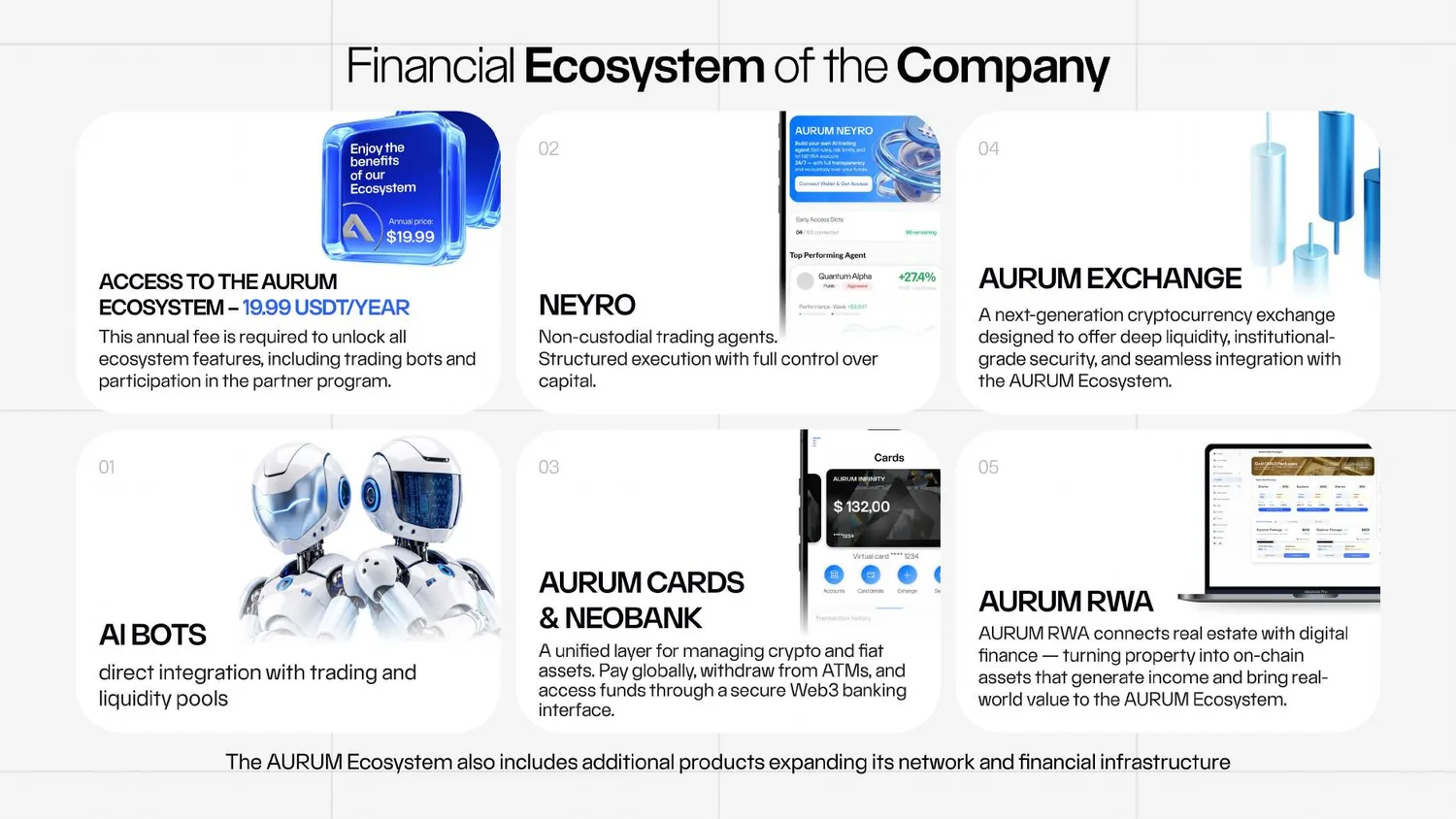
Aurum presents itself as a financial-technology ecosystem combining AI, blockchain, digital-asset management and trading infrastructure. Its current official site highlights liquidity-management bots, NEYRO, Exchange, Cards/NeoBank and RWA. Features, availability and terms can change, so verify the current back office before acting.
Before funding anything, verify the domain, your sponsor/partner code, country eligibility, current terms, fees and supported networks. Never share passwords, 2FA codes, seed phrases or private keys.
Наличността, мрежите, таксите, лимитите и правилата за теглене могат да се променят. Сравнете всяка стъпка с официалния back office.
Наличността, мрежите, таксите, лимитите и правилата за теглене могат да се променят. Сравнете всяка стъпка с официалния back office.
Наличността, мрежите, таксите, лимитите и правилата за теглене могат да се променят. Сравнете всяка стъпка с официалния back office.
Наличността, мрежите, таксите, лимитите и правилата за теглене могат да се променят. Сравнете всяка стъпка с официалния back office.
Наличността, мрежите, таксите, лимитите и правилата за теглене могат да се променят. Сравнете всяка стъпка с официалния back office.
Дигиталните активи, автоматизираната търговия, smart contracts, ливъриджът и партньорските програми носят риск. Няма гарантирани резултати.
Дигиталните активи, автоматизираната търговия, smart contracts, ливъриджът и партньорските програми носят риск. Няма гарантирани резултати.
Дигиталните активи, автоматизираната търговия, smart contracts, ливъриджът и партньорските програми носят риск. Няма гарантирани резултати.
Дигиталните активи, автоматизираната търговия, smart contracts, ливъриджът и партньорските програми носят риск. Няма гарантирани резултати.
Дигиталните активи, автоматизираната търговия, smart contracts, ливъриджът и партньорските програми носят риск. Няма гарантирани резултати.
Дигиталните активи, автоматизираната търговия, smart contracts, ливъриджът и партньорските програми носят риск. Няма гарантирани резултати.
Дигиталните активи, автоматизираната търговия, smart contracts, ливъриджът и партньорските програми носят риск. Няма гарантирани резултати.
Наличността, мрежите, таксите, лимитите и правилата за теглене могат да се променят. Сравнете всяка стъпка с официалния back office.
Наличността, мрежите, таксите, лимитите и правилата за теглене могат да се променят. Сравнете всяка стъпка с официалния back office.
Дигиталните активи, автоматизираната търговия, smart contracts, ливъриджът и партньорските програми носят риск. Няма гарантирани резултати.
Дигиталните активи, автоматизираната търговия, smart contracts, ливъриджът и партньорските програми носят риск. Няма гарантирани резултати.
Дигиталните активи, автоматизираната търговия, smart contracts, ливъриджът и партньорските програми носят риск. Няма гарантирани резултати.
Наличността, мрежите, таксите, лимитите и правилата за теглене могат да се променят. Сравнете всяка стъпка с официалния back office.
Наличността, мрежите, таксите, лимитите и правилата за теглене могат да се променят. Сравнете всяка стъпка с официалния back office.
Наличността, мрежите, таксите, лимитите и правилата за теглене могат да се променят. Сравнете всяка стъпка с официалния back office.
YouTube е външна медия. Зареждането може да изпрати IP и информация за устройството до Google/YouTube.
Прегледано: юли 2026
54-page company presentation used for ecosystem, product, partner-program and event visuals. Conditions and figures must be rechecked in the current back office.
Отвори документаUse the official product pages and the current back office to confirm availability and conditions.
AURUM Home ↗
Subscription ↗
EX-AI Bot ↗
Flash Loans ↗
Zeus AI ↗
NeoBank ↗
Cards ↗
Exchange ↗
Token ↗
36-page company FAQ used for wallet connection, Quantum Alpha, tracking, withdrawals, Compute Balance and partner-bonus explanations.
Отвори документаНезависим образователен наръчник. Не е финансов, правен или данъчен съвет. Наличността, мрежите, таксите, лимитите и правилата за теглене могат да се променят. Сравнете всяка стъпка с официалния back office.
Отвори страницата за регистрация ↗