AURUM · GUÍA INDEPENDIENTE COMPLETA

Todo lo que necesitas para entender, registrarte y usar Aurum

Investiga Aurum, aprende el registro, seguridad, financiación, EX-AI, NEYRO, wallets y solución de problemas en un solo lugar.

Los nombres técnicos de los menús se mantienen en inglés para coincidir con el back office de AURUM.

Divulgación de enlace de socio: registrarte mediante este enlace puede generar un beneficio o comisión al propietario sin coste adicional para ti.
20Todos los temas
20Idioma
2PDF
6YouTube
AURUM ecosystem
AURUM · CENTRO DE CONOCIMIENTO

Centro de conocimiento

Abra una guía específica o busque en toda la base de conocimiento de Aurum.

¿Qué es Aurum?

Aurum se presenta como un ecosistema fintech que combina IA, blockchain, gestión de activos digitales e infraestructura de trading. Su web oficial actual destaca bots de

¿Nuevo en Aurum? Empieza aquí con seguridad

Antes de enviar fondos, verifica dominio, código de socio, elegibilidad del país, condiciones, comisiones y redes. Nunca compartas contraseña, 2FA, seed phrase o claves p

Añadir fondos al saldo principal

La disponibilidad, redes, comisiones, límites y reglas de retiro pueden cambiar. Compara cada paso con el back office oficial antes de confirmar.

Activar EX-AI Bot

La disponibilidad, redes, comisiones, límites y reglas de retiro pueden cambiar. Compara cada paso con el back office oficial antes de confirmar.

Conectar una billetera a Neyro

Los activos digitales, el trading automatizado, los contratos inteligentes, el apalancamiento y los programas de socios implican riesgo. No se garantiza ningún resultado.

Financiar Neyro y activar Quantum Alpha

Los activos digitales, el trading automatizado, los contratos inteligentes, el apalancamiento y los programas de socios implican riesgo. No se garantiza ningún resultado.

Seguir resultados de Neyro y retirar

Los activos digitales, el trading automatizado, los contratos inteligentes, el apalancamiento y los programas de socios implican riesgo. No se garantiza ningún resultado.

Instalar y proteger MetaMask

Los activos digitales, el trading automatizado, los contratos inteligentes, el apalancamiento y los programas de socios implican riesgo. No se garantiza ningún resultado.

Instalar y proteger Trust Wallet

Los activos digitales, el trading automatizado, los contratos inteligentes, el apalancamiento y los programas de socios implican riesgo. No se garantiza ningún resultado.

AURUM NeoBank

La disponibilidad, redes, comisiones, límites y reglas de retiro pueden cambiar. Compara cada paso con el back office oficial antes de confirmar.

AURUM Card

La disponibilidad, redes, comisiones, límites y reglas de retiro pueden cambiar. Compara cada paso con el back office oficial antes de confirmar.

AURUM Exchange

Los activos digitales, el trading automatizado, los contratos inteligentes, el apalancamiento y los programas de socios implican riesgo. No se garantiza ningún resultado.

RWA Gold y Flexible Staking

Los activos digitales, el trading automatizado, los contratos inteligentes, el apalancamiento y los programas de socios implican riesgo. No se garantiza ningún resultado.

Centro de solución de problemas

La disponibilidad, redes, comisiones, límites y reglas de retiro pueden cambiar. Compara cada paso con el back office oficial antes de confirmar.

Documentos oficiales y verificación

Contenido revisado: julio de 2026

Verifica siempre la pantalla actual

La disponibilidad, redes, comisiones, límites y reglas de retiro pueden cambiar. Compara cada paso con el back office oficial antes de confirmar.

Advertencia de riesgo

Los activos digitales, el trading automatizado, los contratos inteligentes, el apalancamiento y los programas de socios implican riesgo. No se garantiza ningún resultado.

AURUM OVERVIEW

¿Qué es Aurum?

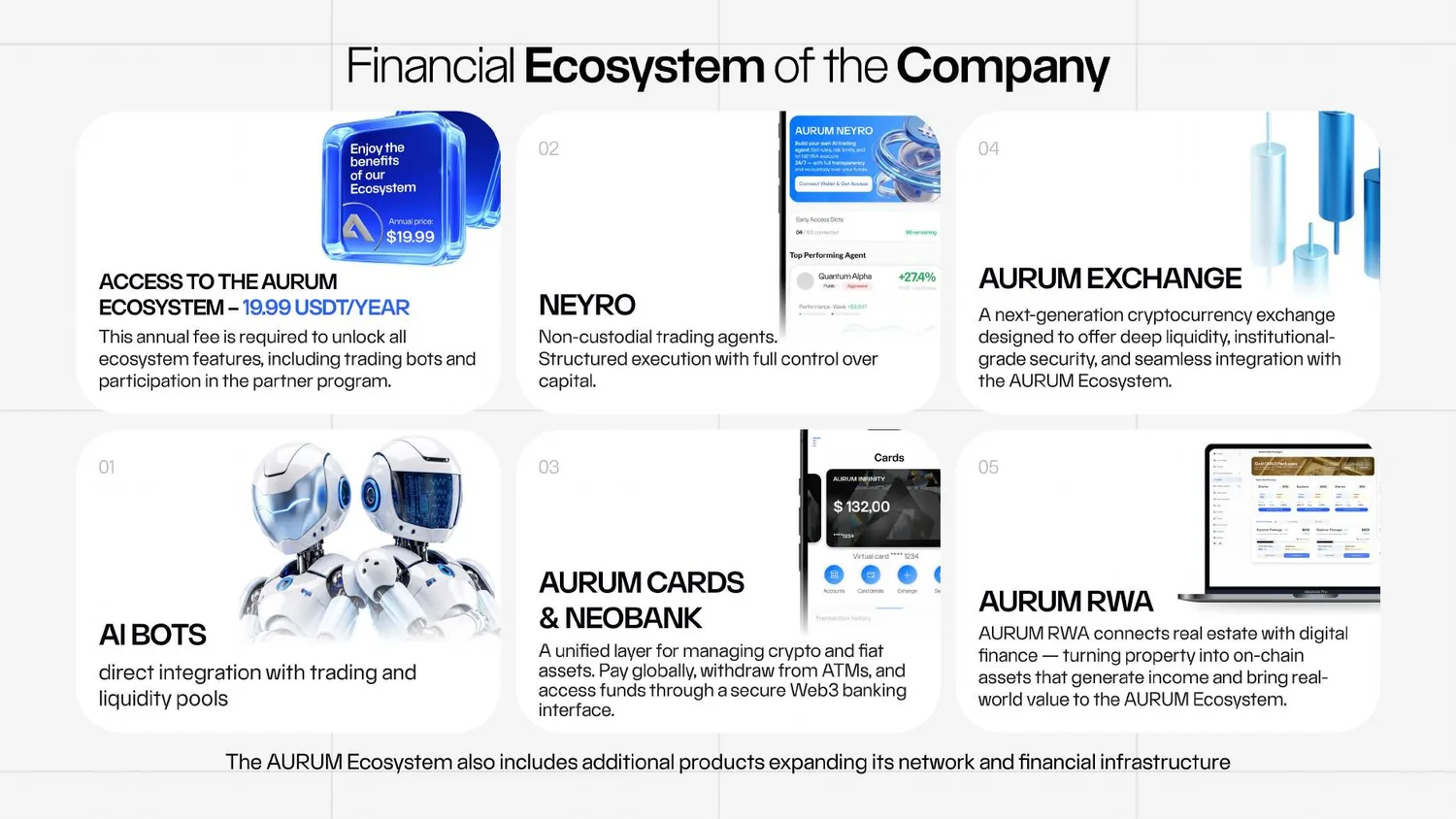
Aurum se presenta como un ecosistema fintech que combina IA, blockchain, gestión de activos digitales e infraestructura de trading. Su web oficial actual destaca bots de gestión de liquidez, NEYRO, Exchange, Cards/NeoBank y RWA. Las funciones y condiciones pueden cambiar.

AI / LiquidityEX-AI · Zeus · EX-AI Pro
Non-custodialNEYRO · Quantum Alpha
InfrastructureExchange · Cards · NeoBank
On-chain / RWARWA · Wallet-connected tools
REGISTRATION

¿Nuevo en Aurum? Empieza aquí con seguridad

Antes de enviar fondos, verifica dominio, código de socio, elegibilidad del país, condiciones, comisiones y redes. Nunca compartas contraseña, 2FA, seed phrase o claves privadas.

✓ Domain✓ Partner code✓ Country eligibility✓ Network✓ 2FA
01

Registro y primer acceso

La disponibilidad, redes, comisiones, límites y reglas de retiro pueden cambiar. Compara cada paso con el back office oficial antes de confirmar.

1
Abrir: Registration page with the W4PPD2 partner link
2
Verificar: Email verification message and first login
3
Revisar: Profile, country, language and contact details
4
Activar: Unique password and two-factor authentication (2FA)
5
Nunca compartir: Verification codes, recovery phrases or private keys
02

Suscripción anual de acceso

La disponibilidad, redes, comisiones, límites y reglas de retiro pueden cambiar. Compara cada paso con el back office oficial antes de confirmar.

1
Abrir: Back Office > Subscription
2
Revisar: Current annual price, included access and renewal conditions
3
Seleccionar: Supported payment option shown on screen
4
Confirmar: Successful subscription activation
5
Comprobar disponibilidad actual: Which products require separate activation
03

Añadir fondos al saldo principal

La disponibilidad, redes, comisiones, límites y reglas de retiro pueden cambiar. Compara cada paso con el back office oficial antes de confirmar.

1
Abrir: Back Office > Wallet / Deposit / Add Funds
2
Seleccionar: Asset, blockchain network and deposit address
3
Comparar: Network, token standard and address on both platforms
4
Probar con un importe pequeño: First transfer before sending a larger amount
5
Guardar: Transaction hash (TXID), date, amount and screenshots
6
Supervisar: Balance and blockchain confirmation status
04

Activar EX-AI Bot

La disponibilidad, redes, comisiones, límites y reglas de retiro pueden cambiar. Compara cada paso con el back office oficial antes de confirmar.

1
Abrir: Back Office > Financial Proposals > EX-AI Bot
2
Verificar: Available balance and eligibility
3
Introducir: Activation amount
4
Revisar: Current term, client share, fees, minimum withdrawal and principal rules
5
Confirmar: Activation request
6
Supervisar: Active status, daily results and withdrawal availability
7
Revisar: Top-up or reinvestment may create a separate term; verify before confirming
05

Usar EX-AI Pro

La disponibilidad, redes, comisiones, límites y reglas de retiro pueden cambiar. Compara cada paso con el back office oficial antes de confirmar.

1
Abrir: Back Office > EX-AI Pro
2
Verificar: Active EX-AI requirement and allocation limit
3
Revisar: Current minimum, flexible deposit and withdrawal conditions
4
Introducir: Amount within the permitted EX-AI balance
5
Confirmar: Activation
6
Supervisar: Real-time trades, performance and available withdrawals
06

Instalar y proteger MetaMask

Los activos digitales, el trading automatizado, los contratos inteligentes, el apalancamiento y los programas de socios implican riesgo. No se garantiza ningún resultado.

1
Instalar: MetaMask only from the official app store or official website
2
Activar: Strong app password and device lock
3
Guardar de forma segura: Secret Recovery Phrase offline; never in screenshots, cloud, email or chat
4
Seleccionar: Network required by the current AURUM/Neyro screen
5
Verificar: Wallet address and gas-token balance
6
Probar con un importe pequeño: Incoming stablecoin transfer before connecting to a contract
07

Instalar y proteger Trust Wallet

Los activos digitales, el trading automatizado, los contratos inteligentes, el apalancamiento y los programas de socios implican riesgo. No se garantiza ningún resultado.

1
Instalar: Trust Wallet only from the official app store
2
Guardar de forma segura: Recovery phrase offline and private
3
Activar: App Lock and biometric security
4
Seleccionar: Required token and blockchain network
5
Verificar: Gas-token balance and receiving address
6
Abrir: WalletConnect scanner / connection request only from the official back office
08

Conectar una billetera a Neyro

Los activos digitales, el trading automatizado, los contratos inteligentes, el apalancamiento y los programas de socios implican riesgo. No se garantiza ningún resultado.

1
Abrir: Back Office > Financial Proposals > Neyro
2
Abrir: Connect Wallet & Get Access
3
Seleccionar: WalletConnect and the wallet you actually use
4
Verificar: Current network in both the back office and wallet
5
Confirmar: Wallet connection request
6
Abrir: Neyro > Get Access
7
Seleccionar: Quantum Alpha
8
Introducir: Funding amount
9
Revisar: Network, contract address, destination and fee in the wallet confirmation
10
Confirmar: Smart-contract transaction
09

Financiar Neyro y activar Quantum Alpha

Los activos digitales, el trading automatizado, los contratos inteligentes, el apalancamiento y los programas de socios implican riesgo. No se garantiza ningún resultado.

1
Verificar: Supported stablecoin and current network shown by Neyro
2
Verificar: Enough gas token in the connected wallet
3
Abrir: Neyro > Get Access > Quantum Alpha
4
Introducir: Amount within available wallet balance
5
Revisar: Token approval and smart-contract confirmation as separate wallet actions when shown
6
Confirmar: Transaction only after checking network, amount, address and fee
7
Supervisar: Personal Neyro performance page after funds reach the contract
10

Seguir resultados de Neyro y retirar

Los activos digitales, el trading automatizado, los contratos inteligentes, el apalancamiento y los programas de socios implican riesgo. No se garantiza ningún resultado.

1
Supervisar: Trade execution, current metrics and agent performance
2
Revisar: Funded amount versus total wallet balance
3
Revisar: Compute Balance, Balance Consumed, Burn Rate and Estimated Duration
4
Verificar: Available for Withdrawal rather than total displayed result
5
Revisar: Current performance-fee period and partner bonus rules
6
Retirar: Stop / unsubscribe workflow when needed
7
Esperar a que finalice: Open positions and return of funds; the supplied FAQ described approximately 48 hours, but verify the current screen
8
Guardar: Withdrawal transaction hash and wallet receipt
11

AURUM Flash Loans

Los activos digitales, el trading automatizado, los contratos inteligentes, el apalancamiento y los programas de socios implican riesgo. No se garantiza ningún resultado.

1
Abrir: Back Office > Flash Loans
2
Verificar: Current Aurum Token requirement and supported network
3
Revisar: NFT license package, price, earning cap and refund conditions
4
Revisar: Smart-contract, DEX, AAVE and arbitrage risks
5
Confirmar: License purchase only after checking all contract details
6
Supervisar: License status, activity and available withdrawal
12

AURUM Zeus AI Bot

Los activos digitales, el trading automatizado, los contratos inteligentes, el apalancamiento y los programas de socios implican riesgo. No se garantiza ningún resultado.

1
Abrir: Official AURUM Zeus AI Bot link from the back office or official website
2
Verificar: Telegram username / bot link before pressing Start
3
Activar: Telegram two-step verification and device security
4
Revisar: Current supported pairs, deposit and withdrawal conditions
5
Probar con un importe pequeño: Small deposit and withdrawal
6
Supervisar: Trades, positions, performance and processing status
7
Nunca compartir: Recovery phrase, private key or remote-access permissions in Telegram
13

AURUM NeoBank

La disponibilidad, redes, comisiones, límites y reglas de retiro pueden cambiar. Compara cada paso con el back office oficial antes de confirmar.

1
Abrir: Official NeoBank app or interface from the AURUM back office
2
Verificar: Country availability, app publisher and official link
3
Revisar: KYC requirements, supported assets, account and conversion fees
4
Activar: App lock, biometric security and transaction notifications
5
Probar con un importe pequeño: Small top-up / transfer
6
Supervisar: Balance, transfers, transaction history and card connection
14

AURUM Card

La disponibilidad, redes, comisiones, límites y reglas de retiro pueden cambiar. Compara cada paso con el back office oficial antes de confirmar.

1
Abrir: NeoBank / Cards
2
Revisar: Current virtual or physical card availability, fees and limits
3
Verificar: KYC, country eligibility and delivery address
4
Seleccionar: Card type and settlement currency
5
Probar con un importe pequeño: Small top-up and low-value purchase
6
Activar: Card freeze, spending limits and transaction notifications
7
Contactar al soporte oficial: If a card, ATM or merchant transaction is disputed
15

AURUM Exchange

Los activos digitales, el trading automatizado, los contratos inteligentes, el apalancamiento y los programas de socios implican riesgo. No se garantiza ningún resultado.

1
Abrir: AURUM Exchange from the official ecosystem link
2
Revisar: Account or wallet connection requirements
3
Seleccionar: Spot, perpetual or another market type
4
Revisar: Order type: Market, Limit, Stop Loss and Take Profit
5
Revisar: Leverage, liquidation, funding, slippage and smart-contract risks
6
Probar con un importe pequeño: Small amount; beginners should avoid leverage until they understand liquidation
7
Retirar: Small test withdrawal before increasing exposure
16

AURUM Token y Network

Los activos digitales, el trading automatizado, los contratos inteligentes, el apalancamiento y los programas de socios implican riesgo. No se garantiza ningún resultado.

1
Abrir: Official AURUM Token page from the AURUM website/back office
2
Verificar: Current network and token contract address from an official source
3
Comparar: Token symbol, decimals, contract and network before adding to a wallet
4
Revisar: Current utility, staking, Flash Loan licensing and fees
5
Probar con un importe pequeño: Small token transfer
6
Comprobar disponibilidad actual: AURUM Network launch/status before attempting to add a new network
7
Nunca compartir: Import a token contract received from an unknown message or group
17

RWA Gold y Flexible Staking

Los activos digitales, el trading automatizado, los contratos inteligentes, el apalancamiento y los programas de socios implican riesgo. No se garantiza ningún resultado.

1
Abrir: Back Office > RWA Gold / Flexible Staking when available
2
Comprobar disponibilidad actual: Whether the product is currently live in your country/account
3
Revisar: Asset allocation, duration, delivery/redemption, fees and counterparty terms
4
Revisar: Difference between physical, tokenized and trading-linked exposure
5
Revisar: Yield examples as projections, not guarantees
6
Confirmar: Only after reading the current product document and risk notice
7
Guardar: Contract, transaction and product statements
18

Programa de socios AURUM

La disponibilidad, redes, comisiones, límites y reglas de retiro pueden cambiar. Compara cada paso con el back office oficial antes de confirmar.

1
Abrir: Back Office > Partner / Team / Marketing Plan
2
Verificar: Your personal W4PPD2 registration link when sharing this guide
3
Revisar: Direct Sales, Team Sales, Legacy Volume, Profitshare, Shareholder Bonus and Compounding rules
4
Revisar: Product-specific bonus eligibility and exclusions
5
Supervisar: Personal volume, team volume, qualification period and rank progress
6
Guardar: Commission statements and records for accounting/tax
7
Nunca compartir: Describe projected earnings as guaranteed income
19

Eventos y requisitos

La disponibilidad, redes, comisiones, límites y reglas de retiro pueden cambiar. Compara cada paso con el back office oficial antes de confirmar.

1
Abrir: Back Office > News / Events / Qualifications
2
Verificar: Event date, location and official announcement
3
Revisar: Direct and network qualification volumes and measurement period
4
Revisar: What travel, accommodation or guest benefits are actually included
5
Supervisar: Qualification dashboard until the closing date
6
Guardar: Official confirmation and travel documents
7
Comprobar disponibilidad actual: Changes, cancellations and country entry requirements
20

Centro de solución de problemas

La disponibilidad, redes, comisiones, límites y reglas de retiro pueden cambiar. Compara cada paso con el back office oficial antes de confirmar.

1
Verificar: Website domain, wallet network, token, address and transaction hash
2
Guardar: Screenshots without exposing personal data, QR codes, balances or recovery phrases
3
Revisar: Blockchain explorer status: pending, confirmed, failed or reverted
4
Contactar al soporte oficial: With account ID, time, amount, network and TXID; never send secrets
5
Esperar a que finalice: Published processing time before submitting duplicate requests
6
Nunca compartir: Send another transfer to “fix” a wrong network unless official support confirms the recovery process
7
Activar: Account, email, wallet and Telegram security after any phishing attempt

Guías en vídeo

YouTube es un medio externo. Al cargarlo puede enviar tu IP e información del dispositivo a Google/YouTube.

PDF

Documentos oficiales y verificación

Contenido revisado: julio de 2026

AURUM Guest Presentation

54-page company presentation used for ecosystem, product, partner-program and event visuals. Conditions and figures must be rechecked in the current back office.

Abrir documento

Neyro FAQ

36-page company FAQ used for wallet connection, Quantum Alpha, tracking, withdrawals, Compute Balance and partner-bonus explanations.

Abrir documento

La seguridad primero

Guía educativa independiente. No es asesoramiento financiero, legal ni fiscal. La disponibilidad, redes, comisiones, límites y reglas de retiro pueden cambiar. Compara cada paso con el back office oficial antes de confirmar.

Abrir página de registro ↗